Trackers are held back before they load
The snippet parks tracker scripts, iframes and pixels in the markup and releases them only once the visitor has agreed. Until then the request never leaves the browser. This is not a report afterwards.
Detection is the product. Everything else (the banner, the log, the team access) rests on the scan seeing what actually runs on the page. These are the three mechanisms that make the difference.
The order is the buyer’s, not the engineer’s. The top item is the one that keeps you out of trouble.
The snippet parks tracker scripts, iframes and pixels in the markup and releases them only once the visitor has agreed. Until then the request never leaves the browser. This is not a report afterwards.
Every page gets a verdict, and every consent action is logged with a timestamp, a visit ID and the categories chosen. We store neither IP address nor user agent, so the log is documentation without becoming another personal-data problem.
HTTP-only cookies, CNAME cloaking and fingerprinting each arrive as their own finding. The section above explains why a JavaScript scanner misses them; the point here is that they are in the result, each with its own legal basis.
All four signals (ad_storage, analytics_storage, ad_user_data and ad_personalization) are mapped from the categories the visitor actually chose. Not from a fixed assumption.
Colour, position, logo and copy. Accept and reject are locked to the same size and weight in code, so no configuration can end up as a dark pattern.
Invite colleagues or clients per site with read or edit access. Agencies can manage several sites without sharing one login.
Each figure below shows one mechanism. They are not illustrations of a principle. They are the path the scan actually takes.
The scan opens the page as a visitor who was never asked, and records what set data along the way. So "fired before consent" is an observation from the run, not a conclusion drawn from whether a banner exists. The report groups one row per tracker, not per page, so a tracker on 59 pages is one line.
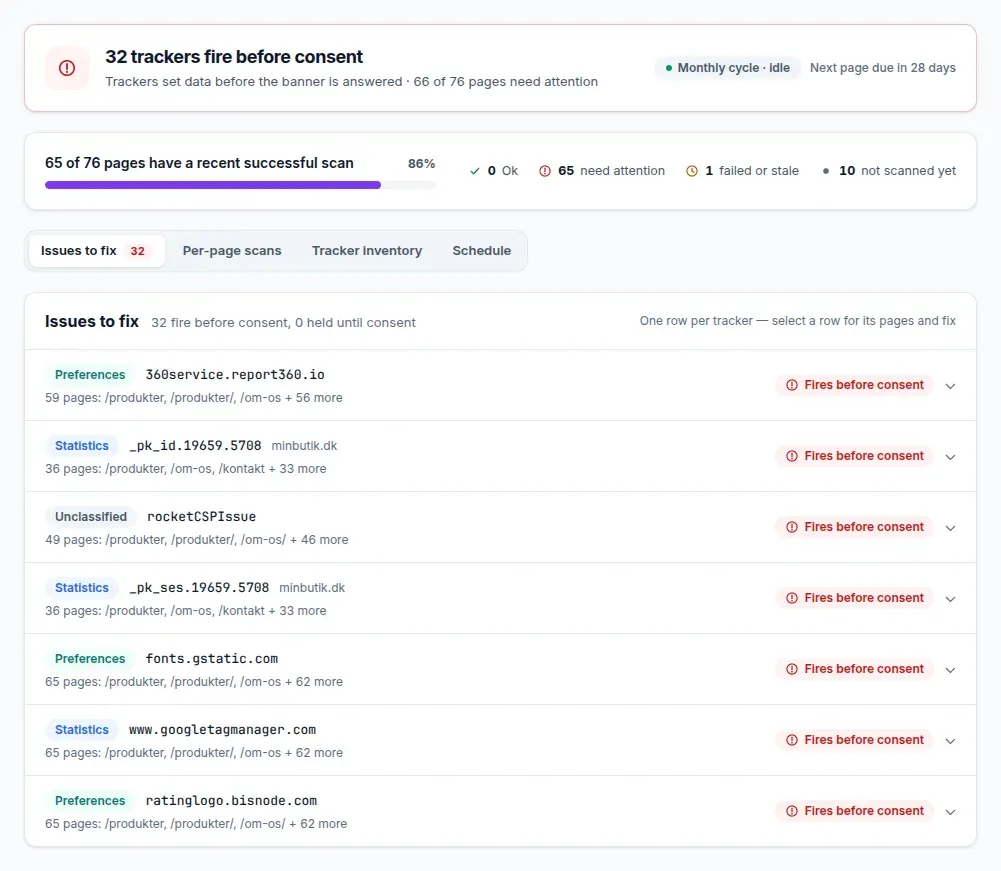
A scanner that reads cookies through JavaScript cannot see an HTTP-only cookie: the flag exists precisely to keep scripts out. Cookiebot’s own documentation says cookies its scanner cannot reach must be added manually. We open the page in a real browser and read the cookie jar, so they appear in the list like everything else — alongside localStorage, fingerprinting signals and the trackers answering from your own subdomain.
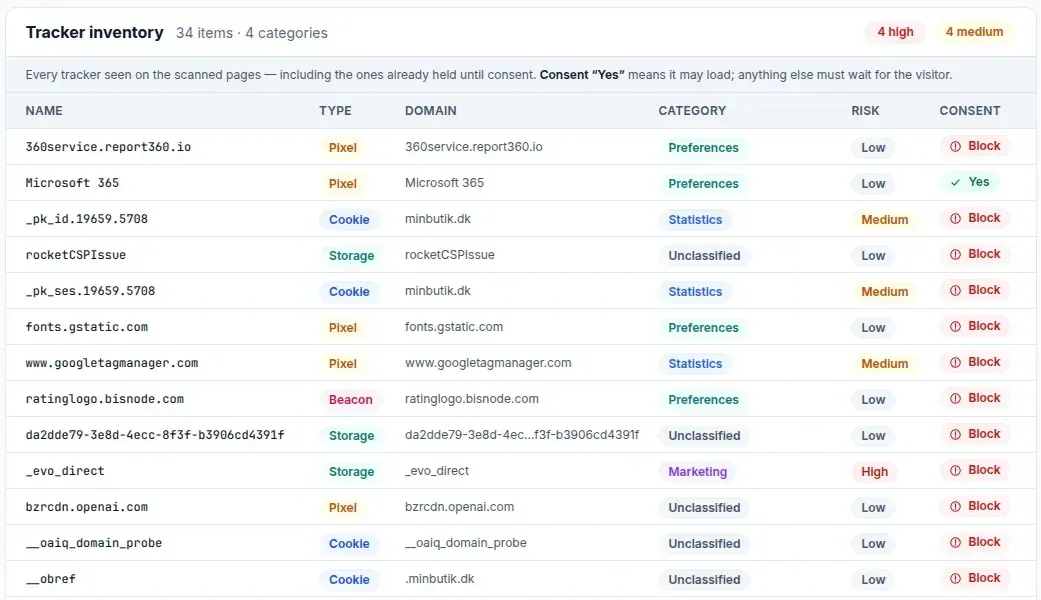
A tracker can answer on your own subdomain, for example metrics.yourdomain.com, through a DNS record. In the browser the traffic looks first-party, and the cookie list shows your own domain. Only the DNS lookup behind the host name reveals who actually answers, and we run it for every third-party host the page loads from.
How a CNAME tracker hides
Visitor
browser
metrics.yourdomain.com
looks first-party
tracker.vendor.com
the actual recipient
Appears as your own domain in the cookie list
Only the DNS lookup reveals who answers
Three hops: the visitor, a subdomain on your own domain, and the tracker behind a DNS record. The subdomain looks first-party, but the DNS lookup points at the tracker.
A cookie banner can only block what it knows about. The snippet parks tracker scripts, iframes and pixels in the markup without an address to fetch from. Only once the visitor has agreed does the tag get its address back and load. On refusal the address is never restored. The request never leaves the browser.
document.cookie only shows the cookies a script itself can read. The browser’s cookie jar also holds the ones the server set with HttpOnly, and those JavaScript cannot touch. We open the page in a real browser and read the jar, not document.cookie.
What JavaScript sees, and what the cookie jar holds
document.cookie
what JavaScript can read
Browser cookie jar
what is actually set
Invisible to scripts, visible in the jar
document.cookie only shows the cookies the script itself can read. The browser’s cookie jar also holds the ones the server set with HttpOnly. A scanner reading through JavaScript only sees the left column.
Canvas, WebGL and AudioContext can identify a visitor without setting a single cookie. Article 5(3) of the ePrivacy Directive is about storing or accessing information on the user’s device — not about cookies — so a fingerprint needs consent even when the cookie list is empty. We instrument the APIs the read uses and report the signal as a finding in its own right.
Fingerprinting without cookies
Measurements in the browser
Combined signal
4f2a9c17…
Cookies stored: 0 Can be followed across pages: yes
Canvas, WebGL and AudioContext measure silently in the browser. The values combine into one hash that can follow the visitor across pages, without a single cookie being set.